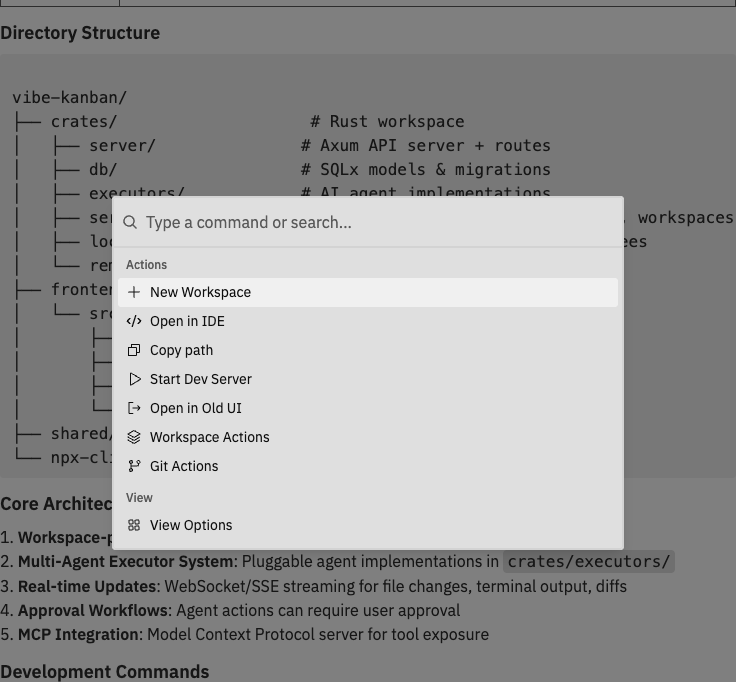
Opening the Command Bar
| Platform | Shortcut |
|---|---|
| Mac | Cmd + K |
| Windows/Linux | Ctrl + K |
Available Commands
Commands are context-aware. Some commands only appear when the current workspace, panel, host capability, or sign-in state supports them.Quick Actions
Access these from the root command bar page:| Command | Description |
|---|---|
| New Workspace | Create a new workspace |
| Create Workspace from PR | Create a workspace from an existing pull request |
| Copy Workspace Path | Copy the current workspace folder path |
| Copy Raw Logs | Copy raw logs when the Logs panel is open |
| Start Dev Server / Stop Dev Server | Start or stop the configured dev server |
| Import CLI Threads | Import Codex CLI thread history for Workspace CLI Threads when that action is available |
General Actions
Global commands appear based on sign-in state and the current app area:| Command | Description |
|---|---|
| Sign In | Open the sign-in dialog when signed out |
| Sign Out | Sign out when signed in |
| Give Feedback | Send product feedback |
| Workspaces Guide | Open the Workspaces guide in workspace context |
| Projects Guide | Open the Projects guide in project/kanban context |
| Project Settings | Open settings for the selected project in project/kanban context |
| Settings | Open the Settings dialog |
Workspace Actions
Manage the current workspace:| Command | Description |
|---|---|
| Start Review | Begin a code review session |
| Rename | Change the workspace name |
| Fork Branch | Create a child workspace from the current workspace branch/state |
| Spin off workspace | Seed create mode from the current workspace repositories and branch |
| Pin / Unpin | Toggle pinned status |
| Archive / Unarchive | Move the workspace to or from archive |
| Delete | Permanently delete the workspace |
| Run Setup Script | Execute the repository setup script |
| Run Cleanup Script | Execute the repository cleanup script |
| Run Archive Script | Execute the repository archive script |
Git Actions
Perform git operations:| Command | Description |
|---|---|
| Create Pull Request | Open PR creation dialog |
| Link Pull Request | Link an existing pull request to the workspace repository |
| Merge | Directly merge this workspace branch into the target branch when allowed |
| Push | Push commits to the remote when an open PR and unpushed commits exist |
| Rebase | Rebase your workspace branch onto the selected target branch |
| Change Target Branch | Switch the merge target |
View Options
Control panel visibility:| Command | Description |
|---|---|
| Toggle Left Sidebar | Show/hide workspace list |
| Toggle Chat Panel | Show/hide conversation |
| Toggle Right Sidebar | Show/hide details |
| Toggle Changes Panel | Show/hide code changes |
| Toggle Branch Graph | Show/hide the branch graph for non-Main Chat workspaces |
| Toggle Logs Panel | Show/hide process logs |
| Toggle Preview Panel | Show/hide browser preview |
Diff Options
Customize the diff viewer (available when the Changes panel is visible):| Command | Description |
|---|---|
| Switch to Side-by-Side View / Switch to Inline View | Toggle the diff layout |
| Enable Line Wrapping / Disable Line Wrapping | Toggle line wrapping |
| Ignore Whitespace Changes / Show Whitespace Changes | Toggle whitespace-only changes |
| Expand All Diffs / Collapse All Diffs | Expand or collapse every diff |
Repository Actions
For workspaces with Git repositories, manage individual repos:| Command | Description |
|---|---|
| Copy Repo Path | Copy specific repository path |
| Repository Settings | Configure repository options |
| Create Pull Request | Create a PR for the selected repo |
| Link Pull Request | Link an existing PR to the selected repo |
| Merge | Directly merge the selected repo’s workspace branch into its target branch when allowed |
| Push | Push commits for the selected repo when applicable |
| Rebase | Rebase the selected repo’s workspace branch |
| Change Target Branch | Change the selected repo’s target branch |
Keyboard Shortcuts
Global Shortcuts
| Shortcut | Action |
|---|---|
Cmd/Ctrl + K | Open command bar |
Escape | Close command bar or dialog |
Sequential Shortcuts
| Shortcut | Action |
|---|---|
g s | Settings |
g n | New Workspace |
w f | Fork branch |
w r | Rename workspace |
w p | Pin/Unpin workspace |
w a | Archive workspace |
w x | Delete workspace |
x p | Create Pull Request |
x m | Merge branch |
x r | Rebase branch |
x u | Push changes |
y p | Copy path |
y l | Copy raw logs |
t d | Toggle dev server |
t w | Toggle line wrapping |
r s | Run setup script |
r c | Run cleanup script |
r a | Run archive script |
v c | Toggle Changes panel |
v b | Toggle Branch Graph |
v l | Toggle Logs panel |
v p | Toggle Preview panel |
v s | Toggle Left Sidebar |
v h | Toggle Chat panel |
Command Bar Navigation
The command bar organises commands into pages:- Root - Quick actions and navigation to other pages
- Workspace Actions - Workspace management commands
- Repository Actions - Per-repository Git and repository commands
- View Options - Panel visibility toggles
- Diff Options - Diff viewer settings
- Issue Actions - Project board commands when the command bar is opened in kanban/project context
Start typing to search for any command. The command bar uses fuzzy matching, so you don’t need to type the exact command name.
Power User Tips
Most useful commands to memorize
Most useful commands to memorize
These commands will speed up your workflow significantly:
| Shortcut | What It Does |
|---|---|
g n | New workspace |
w f | Fork branch from the current workspace |
Cmd/Ctrl + K → pr → Enter | Create pull request |
Cmd/Ctrl + K → changes → Enter | Toggle changes panel |
Cmd/Ctrl + K → preview → Enter | Toggle preview panel |
Fuzzy search tricks
Fuzzy search tricks
The command bar uses fuzzy matching - you can type partial words or abbreviations:
nwmatches “New Workspace”cprmatches “Create Pull Request”tog prevmatches “Toggle Preview Panel”rebmatches “Rebase”
Quick panel toggling
Quick panel toggling
Use the command bar to quickly show/hide panels without moving your mouse:
- Press
Cmd/Ctrl + K - Type
toggle - See all toggle options
- Select the panel you want to show/hide
Context-aware commands
Context-aware commands
Some commands only appear when relevant:
- Push only shows when you have unpushed commits and an open PR
- Merge prompts you to rebase first when you’re behind target
- Repository Actions shows when the workspace has Git repositories
- Diff Options only shows when Changes panel is visible
- Branch Graph is hidden for Main Chat workspaces
Related Documentation
- Interface Guide - Learn about the workspace layout and panels
- Git Operations - Detailed guide to git commands
- General Settings - Application settings and preferences